


Microsoft AI Engineer Coach: The Fitbit for Your AI Coding
You use Claude Code every day. Or Copilot. Or Cursor. You ship faster than you ever did. But there is a question you cannot answer:
Are you actually getting better at using AI?
Not “are you shipping faster.” Not “is the AI generating more code.” Are YOU, the human in the loop, improving as an AI engineer? Are your prompts getting sharper? Is your context hygiene improving? Are you repeating the same patterns that worked three weeks ago while the tools have moved on?
Until now, there was no way to know. Microsoft just open-sourced one.
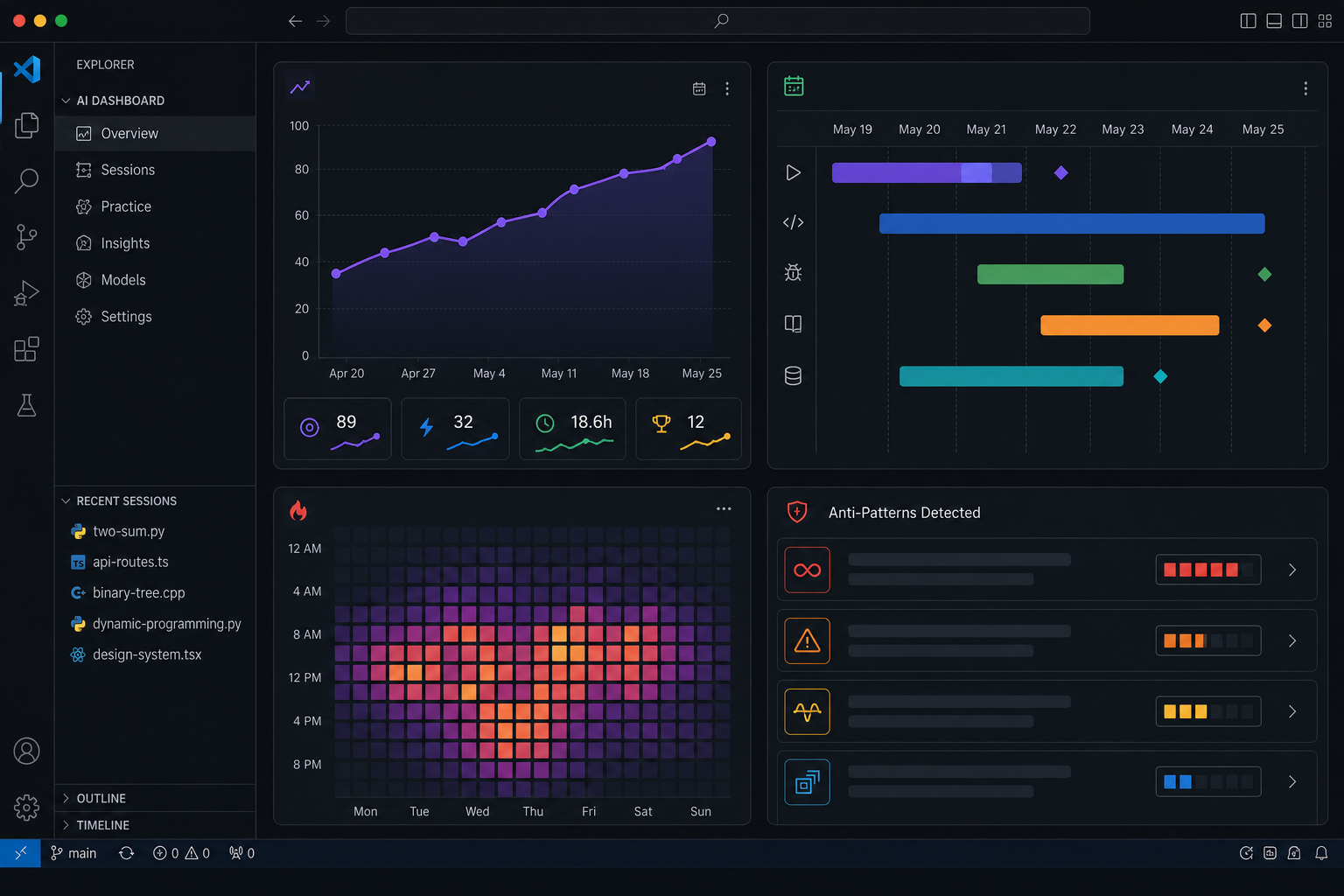
The Fitbit for Your AI Coding
Microsoft AI Engineer Coach is a free, open-source VS Code extension that reads your local AI coding session logs and turns them into a personal analytics dashboard. It works with Claude Code, GitHub Copilot, Cursor, Codex CLI, Windsurf, Cline, or any harness that leaves session logs. Everything runs on your machine. No data leaves.
Akshay Pachaar on X captured it perfectly: “Microsoft built a Fitbit for AI.” A Fitbit does not run for you. It tells you whether your running is working. This is the same idea, applied to the craft of AI-assisted development.
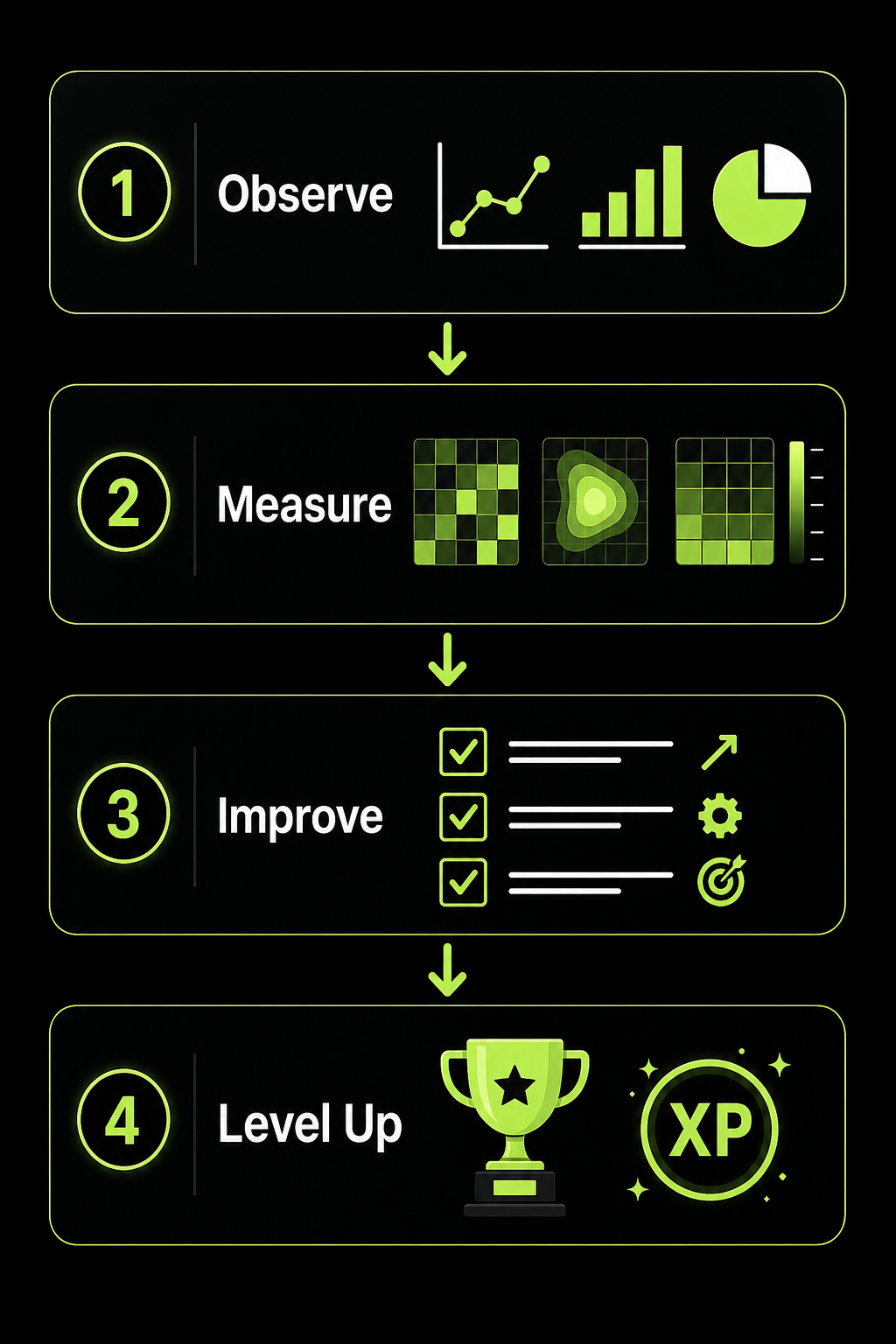
Sumanth P posted the most detailed breakdown on LinkedIn, and it blew up with 129 reactions and counting. The extension has four layers, and each one answers a question you have probably asked yourself.
Layer 1: Observe — What Am I Actually Doing?
The dashboard opens with practice scores that trend week over week. Daily activity charts show when you are most productive. A Gantt-style timeline maps your sessions. A screenshot gallery captures key moments from your coding work.
Most developers using AI tools have no idea what their baseline looks like. This layer gives you one.
Layer 2: Measure — Where Is the AI Really Working?
This is where the extension gets surgical. It breaks down AI-generated code volume by language, model, workspace, and harness. Activity heatmaps reveal your 7×24 coding patterns. You see exactly which tool is doing what, and when.
Samik Roy, a Microsoft MVP in threat intelligence, pointed out the security angle: “Most AI Engineers using GitHub Copilot have NO visibility into how their AI is actually performing inside their IDE. Weak context hygiene equals hallucinated KQL detections. Anti-patterns in security prompts equal missed threats.”
If you are writing security-sensitive code with AI and you cannot see what the AI is doing, you are flying blind.
Layer 3: Improve — 45 Ways You Are Doing It Wrong
This is the core. AI Engineer Coach ships with 45 anti-pattern detection rules across five categories:
- Prompt quality — Are your prompts specific enough? Are you repeating yourself?
- Session hygiene — Are your sessions focused or scattered? Are you context-switching too much?
- Code review — Are you reviewing AI output or just accepting it?
- Tool mastery — Are you using the right harness features for the task?
- Context management — Is your CLAUDE.md or Copilot instructions file healthy?
Each rule comes with a severity rating and a concrete action. The Skill Finder discovers repeated prompt patterns and matches them to reusable skills from the open-source catalog. Context Health runs agentic readiness checks and audits your instruction files.
A Rule Playground lets you edit rules and test them live against your own data. You are not stuck with Microsoft’s rules. You can write your own.
Layer 4: Level Up — Gamification That Actually Works
Personalized quizzes are generated from your actual usage data. Not generic “what is a large language model” questions. Questions about YOUR patterns, YOUR anti-patterns, YOUR gaps.
XP-based progression takes you from Bronze to Diamond. An Agentic SDLC view shows how you use AI across the full development lifecycle, from planning to deployment.
This is not a leaderboard. It is a mirror.
Who Is This Actually For?
The research we did across LinkedIn and X revealed something interesting: the people most excited about this tool are not beginners. They are experienced developers who already use AI heavily and want to get better.
Rob A., a data professional with 25 years of experience, called it “something worth installing this weekend.” Armand Seukunian, a cloud architect, said most developers “have no idea how they compare to last week, let alone to good practice.”
The common thread: AI Engineer Coach is not for people wondering whether to try AI. It is for people already using AI who suspect they have plateaued.
The One Thing It Will Not Do
AI Engineer Coach will not write code for you. It will not suggest better prompts in real time. It will not fix your CLAUDE.md file.
It will simply show you the data. What you do with it is up to you.
That is the point. A Fitbit does not run for you. It tells you whether your running is working. This extension does the same for your AI engineering.
If you are serious about getting better at working with AI, not just using it but mastering it, this is the tool that tells you where you stand.
GitHub: microsoft/AI-Engineering-Coach
Sources
- Sumanth P — Full 4-layer breakdown (LinkedIn, Jun 2026)
- Akshay Pachaar — “Microsoft built a Fitbit for AI” (X, May 2026)
- Filipe Croval — “The AI coding coach every serious dev needs” (X, May 2026)
- Microsoft’s AI Engineering Coach: Build Smarter Agentic AI — Samik Roy (YouTube, Jun 2026)
- Analyze AI Coding Usage with Microsoft AI Engineer Coach — Locally Hosted (YouTube, Jun 2026)
- Microsoft’s FREE AI Toolkit Changes Coding Forever — Mervin Praison (YouTube, Jun 2026)